
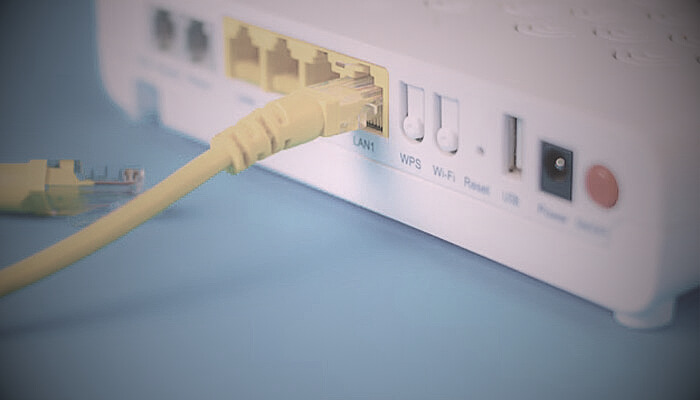
If you’ve ever set up a home Wi-Fi network, you’ve encountered the WPS button or WPS mode if your router and devices are high-tech enough. WPS is short for Wi-Fi Protected Setup: a method of connecting your devices to your WiFi network with the convenience, speed and security you would expect. But what is WPS, exactly — and how does it work? In this post, we’re going to explore the significance of WPS — what it is, how it works, its benefits and address some frequently asked questions about WPS technology.
What is WPS?
WiFi Protected Setup (WPS) is a protocol for simple and secure establishment of wireless networks. First introduced by the Wi-Fi Alliance, WPS was designed to make it easier to connect certain types of devices to your home network without needing to type in a long and complex WiFi password. With WPS, linking a smartphone, tablet, computer or other Wi-Fi capable item is as simple as pushing a button or typing in a small pin number. It’s very handy for non-geeks what might struggle to manually configure network settings.
WPS uses various methods, including the Push Button Connect (PBC) and PIN methods, to establish a secure connection between your device and router. Let’s explore how WPS works in more detail.
How Does WPS Work?
WPS works through two main methods: Push Button Connect (PBC) and PIN method.
Push Button Connect (PBC):
-
The PBC approach is the most direct and simplest. When a person pushes the WPS button on your router, it sends a signal to let devices connect to your Wi-Fi without explicitly entering in a password.
-
Just press the WPS button on your router, and a short time later press the WPS button on any of your devices – The connection will be established automatically for you.
-
The router automatically encrypts data with the device to create a secure connection, giving you no restrictions on password settings.
PIN Method:
-
With this method, your router creates a unique 8-digit PIN that you can enter by accessing the network settings of your device.
-
With the PIN in place, your device can be safely connected to the Wi-Fi network.
This way is helpful if the PBC mode isn’t available in a device, or you want to be more hands on.
Advantages of Using WPS
WPS has some merits which may enhance user experience, particularly for the less technically trekking population. These advantages include:
Simplified Setup:
Perhaps the single biggest reason for using WPS is … simplicity. You don’t have to enter a long Wi-Fi password or go through any tricky settings. Just a press of button or by entering the PIN on the router will get your system securely connected.
Improved Security:
WPS enables the router to establish a secure connection with your device via WPA or WPA2 encryption. It’s more secure than an open network or an unsecured connection.
WPS does away with the need to broadcast your Wi-Fi password — reducing the likelihood of it being hacked or exposed.
Speed:
Wi-Fi WPS (Wi-Fi Protected Setup), you can get Wi-Fi without password compared to manual security code input and in less than 30 seconds. And is supported even when connecting multiple devices in one, like smart home or peripheral devices for a home maker or printer system.
Convenience:
WPS is incredibly user-friendly. It’s perfect for anyone who has difficulty entering complicated Wi-Fi passwords or juggling settings on devices.
How to Turn on WPS on Your Router
Here is how you can turn on WPS on your router:
Find the WPS Button on your Router:
Most new routers with WPS feature a button on the back or side. The button is frequently marked with the letters “WPS” or an icon that looks like two arrows following each other in a circle.
Press the WPS Button:
When you find the WPS button, press it. The router shall provide a blinking light to indicate that WPS is enabled and functioning.
Connect Your Device:
On your device, go to Wi-Fi settings and connect to your router’s network. You should typically get an option to connect using WPS. Just follow the prompts to connect.
Common Issues with WPS
WPS is a handy feature to have, but it can break stuff sometimes. Here, we outline some frequent issues and their solutions:
WPS Not Working:
If the WPS connection fails, please make sure that both the router and your device is within range. Occasionally, turning the router and device off and on can resolve any connectivity issues.
WPS PIN Not Accepted:
Make sure the correct PIN was used. If the PIN is accepted, that’s great—it means your router accepts WPS. If not, reset the router to obtain a fresh PIN.
WPS Disabled on the Router:
Some routers may have WPS turned off for security reasons. You can turn it on from the settings page in your router by logging in to it using admin credentials.
FAQ:
1. Is WPS Safe to Use?
WPS is generally considered safe, as it uses strong encryption like WPA or WPA2. However, certain vulnerabilities have been discovered in the WPS protocol, specifically the PIN method. If security is a primary concern, it is advisable to disable WPS or use alternative connection methods like WPA2.
2. How Do I Know If My Router Supports WPS?
Most modern routers support WPS. To check if your router has this feature, look for a WPS button or refer to the router’s manual or specifications. Additionally, you can log in to your router’s web interface and check if there’s an option to enable WPS.
3. Can I Use WPS with Any Device?
WPS is compatible with a wide range of devices, including smartphones, tablets, laptops, printers, and more. However, some older devices may not support WPS, in which case you will need to manually enter the Wi-Fi password.
4. What Should I Do If WPS Isn’t Working on My Device?
If WPS isn’t working, try restarting your router and device. Ensure that WPS is enabled on both devices. If problems persist, consult the router’s manual or reset the router to its default settings and try again.
5. How Can I Disable WPS on My Router?
If you prefer not to use WPS, you can disable it via your router’s settings page. This can usually be done by logging into the router’s admin interface and turning off the WPS option under the wireless settings.
Conclusion:
WPS is definitely a very useful, easy way for people to connect their Wi-Fi. It’s user-friendly, so it can be great for less tech-savvy people or those who often hook up several devices all at once. Although it provides various benefits such as security and fast speed, several weaknesses can cause your network to be in harm’s way if you’re using old router. When more and more advanced devices come into being, consumers can also turn off WPS and make use of other connection modes for security improvement.
However, WPS is still very useful to many users for convenient and fast network setup. If you use WPS, make sure your router’s firmware is completely current and mindful of the spate of security issues involving the protocol.